Todoist vs Listee: Which Task Manager Fits Your Voice Workflow?
The short answer is that Listee is the better fit when your workflow starts on an Amazon Echo and ends in a simple, ordered category, while Todoist is the better fit when you need dates, priorities, reminders, filters, project views, and voice capture inside Todoist's own apps. Neither product is the universal winner.
The most important distinction is not “voice versus no voice.” Both products offer a voice path, but the paths begin on different devices. Listee documents a current custom Alexa skill for direct Echo capture. Todoist documents Ramble, an in-app voice-to-tasks feature. This comparison was checked against official product information on August 10, 2026 because voice integrations, plan limits, and pricing change.
Todoist vs Listee at a glance
| Decision factor | Listee | Todoist |
|---|---|---|
| Voice entry point | Echo through the My Task custom skill; natural-language requests in web AI chat | Ramble in Todoist apps and supported devices |
| Task structure | Categories, manual order, completion state, and category notes | Projects, dates, priorities, labels, filters, reminders, sub-tasks, and multiple views |
| Review workflow | Process an ordered category in the web app | Review Inbox, Today, Upcoming, projects, filters, boards, or calendar views |
| Collaboration | Share a category with an existing user; current help says changes appear after refresh | Share projects, assign tasks, comment, attach files, and notify collaborators |
| AI assistance | Chat works with tasks and category notes; usage is request-limited | Ramble plus plan-dependent Task Assist, Email Assist, and Filter Assist |
| Free starting point | One Alexa-enabled category and 50 AI requests per month | Five personal projects, reminders, three filters, and limited Ramble sessions |
The table deliberately avoids calling one system more “powerful” in every context. More fields and views help when you use them consistently. They also create more decisions during capture and review. A simpler category can be an advantage when the main job is to remember an item immediately and process it later.
Voice capture is the biggest difference
Listee starts with a custom Alexa skill
Listee's current Alexa guide names the skill My Task by Listee and the invocation “my task.” A one-shot command is:
“Alexa, ask my task to add milk.”
With one Alexa-enabled category, the task goes to that category. With multiple enabled categories, the skill asks for a category number. You can also open the skill with “Alexa, open my task,” add several items, and then say “stop” or “exit.”
This is service-specific capture. The task goes to Listee, not to Alexa's native shopping or to-do list. The evidence supports task creation by voice; completion, editing, deletion, and reordering remain web actions. If you want the full account-linking and command sequence, follow the Alexa to-do list setup guide.
Todoist starts with Ramble inside Todoist
Todoist's current voice feature is Ramble. You open it in Todoist, speak naturally, preview the structured tasks, correct or remove items, and then save them. Todoist says Ramble can extract details such as projects, dates, deadlines, and priorities when they are present in the speech.
Ramble is available with limited sessions on the free Beginner plan and unlimited sessions, subject to rate limits, on Pro and Business. Todoist also documents a narrower Wear OS beta for quick capture to the Inbox.
That makes Todoist voice-enabled, but it does not make Ramble an Alexa integration. The current official Todoist integration catalog reviewed for this article did not list Alexa. This is a dated observation, not a claim that every third-party automation has disappeared.
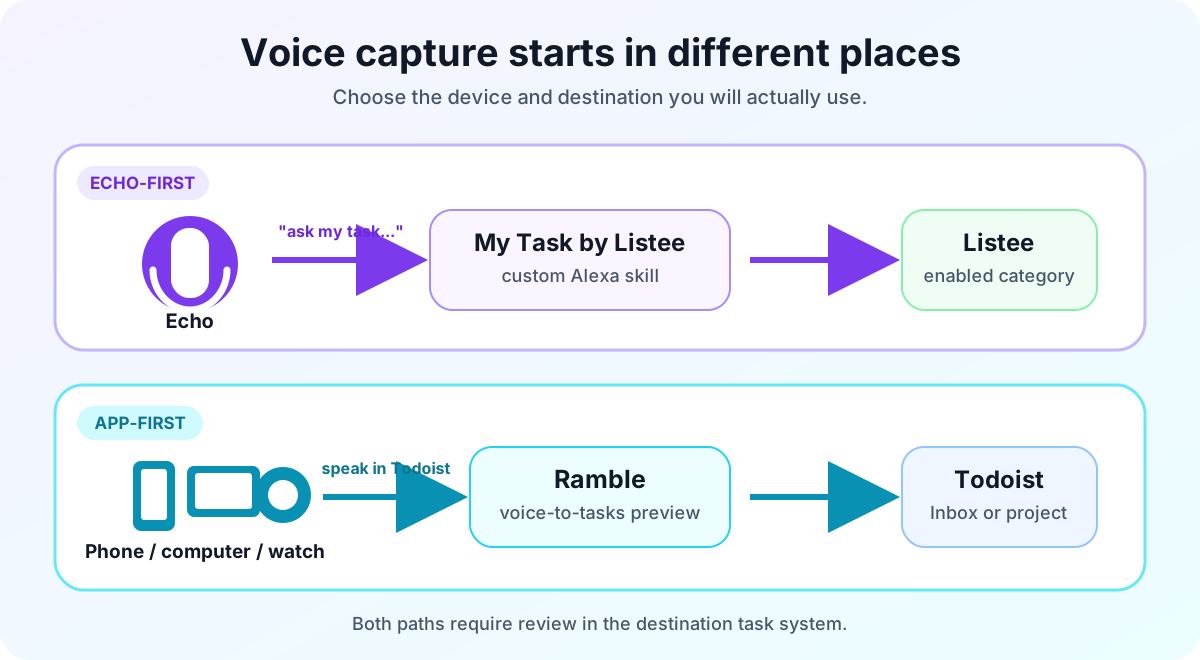
The voice paths begin on different devices and store tasks in different systems. This is an explanatory diagram, not product UI.
Why older Alexa instructions can be misleading
Amazon ended support for List Skills and the List Management REST API on July 1, 2024. Native Alexa lists still exist, and developers can still build custom skills, but old instructions that synchronized Alexa's built-in list with another service may no longer describe a supported path.
When evaluating an Alexa workflow in 2026, test the exact invocation, verify the destination, and check that the item appears there. For more current options, see the comparison of Alexa task-management skills.
Organization and daily planning
Listee uses categories as the main container. Its task-management guide documents creating, checking or unchecking, editing, deleting, reordering, bulk-moving, and bulk-deleting tasks. New tasks appear at the top, and you can drag them into a deliberate order. Category notes provide a separate place for related context.
The current task model is intentionally simpler than Todoist's. This article found no verified structured fields in Listee for due dates, deadlines, priorities, recurring tasks, or reminders, so those are not part of this comparison. A task name can contain timing words, but text in a name is not the same as a reminder or scheduled field.
Todoist provides a deeper planning model. Its getting-started guide documents projects, Inbox, Today, and Upcoming. Official help also documents dates, recurring dates, priorities, labels, filters, reminders, sub-tasks, and list, board, and calendar layouts with plan-dependent limits.
Consider a weekly report. In Listee, you might place “Draft weekly report” near the top of a Work category and move or check it during review. In Todoist, you can put the task in a project, give it a recurring date, add a priority and reminder, and find it through Today or a filter. Todoist represents more of the plan. Listee asks you to maintain less metadata.
Choose the structure you will keep current. A carefully designed set of filters is not useful if incoming tasks remain unprocessed. A simple ordered category is not enough if missing a deadline has consequences.
Sharing and collaboration
Listee shares at the category level. Its sharing guide says the recipient must already have a Listee account. Current shared users can view, create, edit, delete, and reorder tasks, and the guide tells collaborators to refresh the page to see changes. Treat this as shared category access, not guaranteed real-time co-editing.
Todoist shares at the project level. Its friends and family collaboration guide documents assigning a task to one person, using comments, attaching files, and notifying people. Team workspaces add further controls on paid team plans.
For a shared grocery or household capture list, Listee's category model may be sufficient, especially when one person adds items through Echo. For a project where each action needs an owner, discussion, attachments, and notifications, Todoist provides the more explicit collaboration model.
AI assistance: compare actions, not labels
Listee's AI chat can create, list, rename, complete or uncomplete, delete, and search tasks. It can also work with notes stored in categories. The useful pattern is conversational control of a persistent list: ask for the available categories, add a task to the selected category, and review the result in the same workspace.
Todoist Assist covers several narrower workflows. Todoist's official overview describes Ramble for speech capture, Task Assist for suggestions and breaking down work, Email Assist for extracting tasks from forwarded email, and Filter Assist for building filters from plain language. Availability depends on the plan.
If AI behavior is central to your decision, list the exact action you expect: “turn a spoken brain dump into dated tasks,” “search my category notes,” or “break one task into sub-tasks.” Then verify that action, its review step, and its plan limit. The broader AI task-manager guide provides a five-step test workflow.
Free and paid plan implications
As checked on August 10, 2026, Listee Free is $0 and includes one Alexa-enabled category, 50 AI requests per month, and 14 days of chat history. Listee Plus is listed at $10 per user per month and adds multiple Alexa-enabled categories, 500 AI requests, unlimited chat history, and API/MCP access. Review the current Listee pricing page before purchasing because quotas and prices can change.
Todoist Beginner is free and currently includes five personal projects, reminders, three filter views, and up to 10 Ramble sessions per month. Todoist's current pricing FAQ lists Pro at $7 monthly or $60 yearly, with higher limits and features such as custom reminders, calendar layout, Task Assist, and unlimited Ramble subject to rate limits.
The headline subscription price does not settle the decision. If direct Echo capture is required, a cheaper task system without that path does not meet the requirement. If deadlines, filters, and calendar planning are required, a simple voice list may create more manual work later.
Which should you choose?
Choose Listee when most of these are true:
- You want to add tasks from an Echo with a documented custom skill.
- A small number of ordered categories is enough structure.
- You are comfortable reviewing, editing, and completing tasks in the web app.
- Shared category access meets your household or small-group needs.
- You want natural-language task and note operations in the same workspace.
Choose Todoist when most of these are true:
- You capture by phone, desktop, or supported wearable rather than by Echo.
- Dates, deadlines, recurring schedules, priorities, reminders, labels, or filters are essential.
- You need projects, multiple views, explicit task assignment, comments, or files.
- You want Ramble and Task Assist inside a more detailed planning system.
- You already rely on Todoist's apps or integrations.
Before migrating, run one realistic 15-minute test in each candidate:
- Capture five mixed tasks using the device you normally have nearby.
- Correct one misunderstood item and confirm the saved destination.
- Organize the five tasks for today, later, and someone else.
- Complete one task and find the remaining four again.
- Count the manual decisions and missing fields that slowed you down.
The winner is the workflow with the right destination, enough structure, and a review habit you will actually repeat.
The bottom line
Listee and Todoist solve different voice problems. Listee gives Alexa users a direct Echo-to-category route and a simpler ordered list. Todoist gives app users richer voice parsing inside a substantially deeper planning system. Choose based on your capture device and downstream planning needs, then verify the current plan before committing.
If Echo capture is your deciding requirement, create a free Listee account, enable one category, and test the complete capture-to-review loop with non-sensitive tasks.