Best Alexa Skills for Task Management in 2026: 5 Current Options
The best Alexa task-management skill depends on where you want the task to end up. My Task by Listee is a practical fit for voice capture into organized task categories, ClickUp is aimed at work-task capture and due-task readback, AnyList and OurGroceries focus on shopping, and Amazon's Task Tracker Blueprint is useful for repeatable checklists. Alexa's built-in Lists remain the simplest option when you do not need a separate task app.
This is not a universal ranking. It is a use-case comparison based on product documentation and live listings checked on August 9, 2026. Skill availability and Alexa behavior can vary by country, account, and device, so confirm an option in your own Alexa app before building a routine around it.
The best Alexa task-management options at a glance
To make this list, an option needed current first-party evidence, a useful task or list action, and a clearly identifiable workflow. The table also separates vendor-documented capabilities from limitations reported by those same vendors.
| Option | Best for | How you start | Separate account or setup | Readback or review | Important 2026 caveat |
|---|---|---|---|---|---|
| My Task by Listee | Personal or shared tasks organized by category | “Alexa, open my task” or “Alexa, ask my task to add…” | Listee account and account linking | Review and process tasks in Listee | Voice claims here are limited to capture; web actions handle completion and editing |
| ClickUp | Capturing work tasks and hearing due tasks | Enable the ClickUp skill and use its documented commands | ClickUp account | Store listing describes Home, today, and tomorrow task readback | Confirm store availability for your region |
| AnyList | Shopping lists and meal-planning households | Use the AnyList invocation in each command | AnyList account and custom skill | Skill commands include reading and managing list items | AnyList documents current Ask/Tell recognition problems |
| OurGroceries | Shared household grocery lists | “Alexa, ask OurGroceries…” | OurGroceries account and skill linking | Skill supports reading and managing grocery items | Vendor says Alexa+ sometimes fails to understand the skill |
| Task Tracker Blueprint | Reusable routines and personal checklists | Create your own Blueprint skill | Amazon Blueprint setup | Check items off in the custom checklist | It is not a synced general-purpose task manager |
Alexa's native Lists are not included as one of the five skills because they are a built-in feature. They are still the baseline against which every custom skill should be judged.
First, decide whether Alexa's built-in lists are enough
For quick household capture, the zero-setup choice is often the right one. Amazon documents native voice commands for creating lists and adding, removing, or clearing items. A command such as “Alexa, add batteries to my shopping list” targets Alexa's own list system; it does not automatically send the item to Listee, AnyList, or another service.
If Alexa+ is available on your account, Amazon also documents a task view that brings reminders and to-dos together, including recurring and follow-up reminders. Availability is not identical in every country or on every device, so treat this as an account-specific enhancement rather than a universal replacement for a task app.
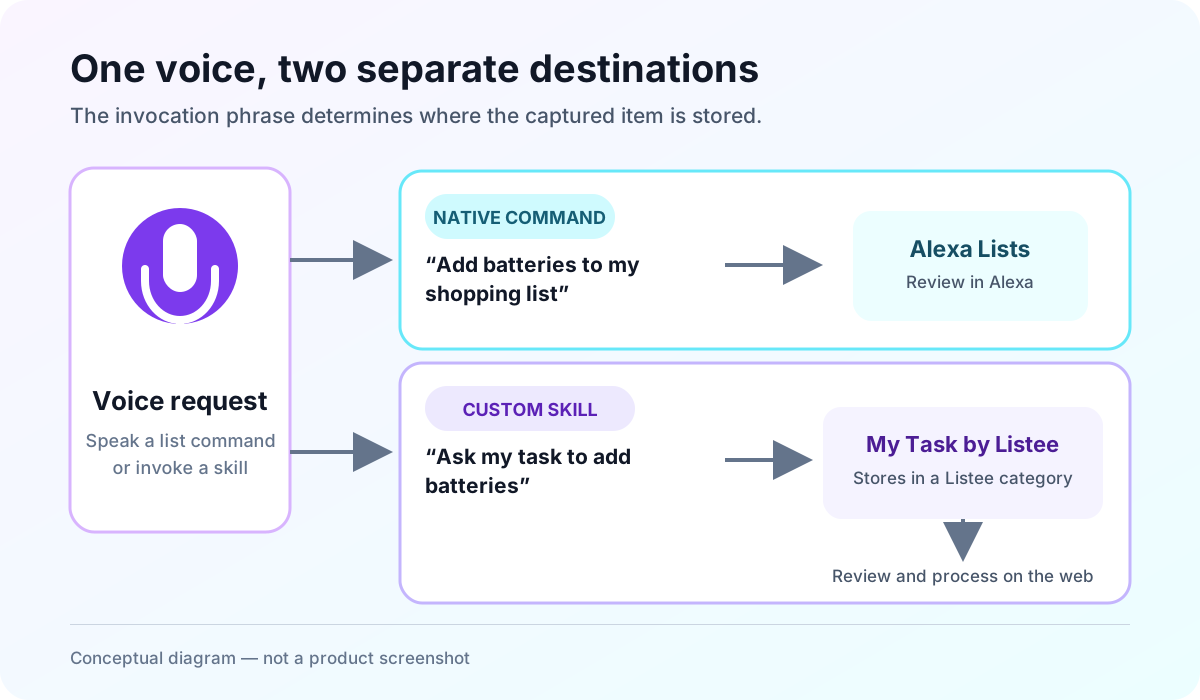
Native lists and service-backed skills are separate paths. The invocation phrase determines which path receives the item.
A custom skill becomes useful when you need a specialized destination: work tasks in ClickUp, grocery features in AnyList or OurGroceries, or category-based processing in Listee. For a complete setup walkthrough, see how to use Alexa as a to-do list manager.
One historical detail explains why many older articles are confusing. Amazon ended support for the List Skill API and List Management REST API on July 1, 2024. Native Alexa lists still exist, but old instructions that promised automatic synchronization with third-party apps may no longer describe a current integration.
My Task by Listee — best for voice capture into task categories
My Task by Listee is designed for capturing a task by voice and then processing it in a task-focused web app. The live English skill uses the invocation name “my task.” You can open a session with “Alexa, open my task,” or use the documented one-shot pattern “Alexa, ask my task to add milk.” When the session is open, you can add more than one task before saying “stop” or “exit.”
Listee routes a captured task into an Alexa-enabled category. With one enabled category, that destination is automatic. With multiple enabled categories, the skill asks you to choose a category by number. This makes it suitable for people who want separate work, home, or shopping queues without pretending that voice capture is the entire task-management process.
After capture, Listee's task-management guide explains how to complete, edit, delete, reorder, or move tasks in the web interface. Those are web actions. The current Alexa evidence supports task addition, not completing, editing, or deleting tasks by voice.
As checked on August 9, 2026, Listee Free includes Alexa voice control for one category, while Plus adds multiple Alexa-enabled categories. Because plan details can change, use the current Listee pricing page rather than relying on a price quoted in an old comparison. The Alexa integration guide has the current account-linking steps and command patterns.
Categories can also be shared with existing Listee users. The current sharing guide says collaborators see changes after refreshing the page, so this should be described as shared category access—not guaranteed real-time collaboration.
Choose Listee when: you want hands-free capture to feed an organized category system, and you are comfortable reviewing and processing those tasks in Listee afterward.
ClickUp — best for work-task capture and due-task readback
ClickUp is the work-oriented option in this set. Its current Alexa Skills Store listing describes creating tasks and reminders and reading tasks from Home, today, or tomorrow views. That combination can be useful when a spoken note needs to land in the same system as a team's work rather than in a household shopping list.
The listing is the evidence for the capabilities described here; this article does not extend those claims to every ClickUp view, workspace permission, or language. Check that the skill appears in your local Alexa store before following setup instructions, and test with a non-sensitive task first so you know which workspace and list receive it.
Choose ClickUp when: your main requirement is work capture or due-task readback in an existing ClickUp workflow.
AnyList — best for shopping and meal planning
AnyList combines shared shopping lists with recipe and meal-planning features. Its feature overview says core list creation and sharing are free, and its Alexa documentation provides custom-skill commands for managing list items. This is a better match for groceries than for project milestones or a general work backlog.
There is an important reliability qualifier. AnyList documents a widespread Ask/Tell recognition problem and separately documents an issue affecting use outside the United States. That is the vendor's description, not a claim that the skill fails for every account. Follow AnyList's current command wording and verify the item in the app.
Choose AnyList when: shopping, recipes, and shared household planning matter more than general task structure.
OurGroceries — best for household grocery lists
OurGroceries is another specialized shopping option. Its current user guide documents commands for adding, reading, checking, and removing grocery items through its Alexa skill. Because the underlying list is shared through OurGroceries, household members can work from the same grocery list in the service's apps.
Its own FAQ says Alexa+ sometimes does not understand the skill and that the bug occasionally recurs. That wording matters: it is a documented limitation, but not evidence of universal failure. If you use Alexa+, verify the exact invocation and confirm the result in OurGroceries before depending on it during a shopping trip.
Choose OurGroceries when: you want a focused shared grocery list and its documented command set matches your household routine.
Task Tracker Blueprint — best for reusable routines
Amazon's Task Tracker Blueprint lets you create a personal Alexa skill around a reusable checklist. Think morning routine, closing checklist, packing list, or chores that follow the same sequence each time. You define the steps, then use the resulting skill to work through and check off that list.
This is fundamentally different from syncing a cloud task manager. It is strongest when the procedure repeats and the checklist itself is the product. It is a weaker fit when tasks need rich project context, cross-device assignment, or flexible category organization.
Choose Task Tracker Blueprint when: you need a repeatable spoken checklist rather than a general inbox for changing tasks.
How to choose the right option
Start with the destination, not the brand name:
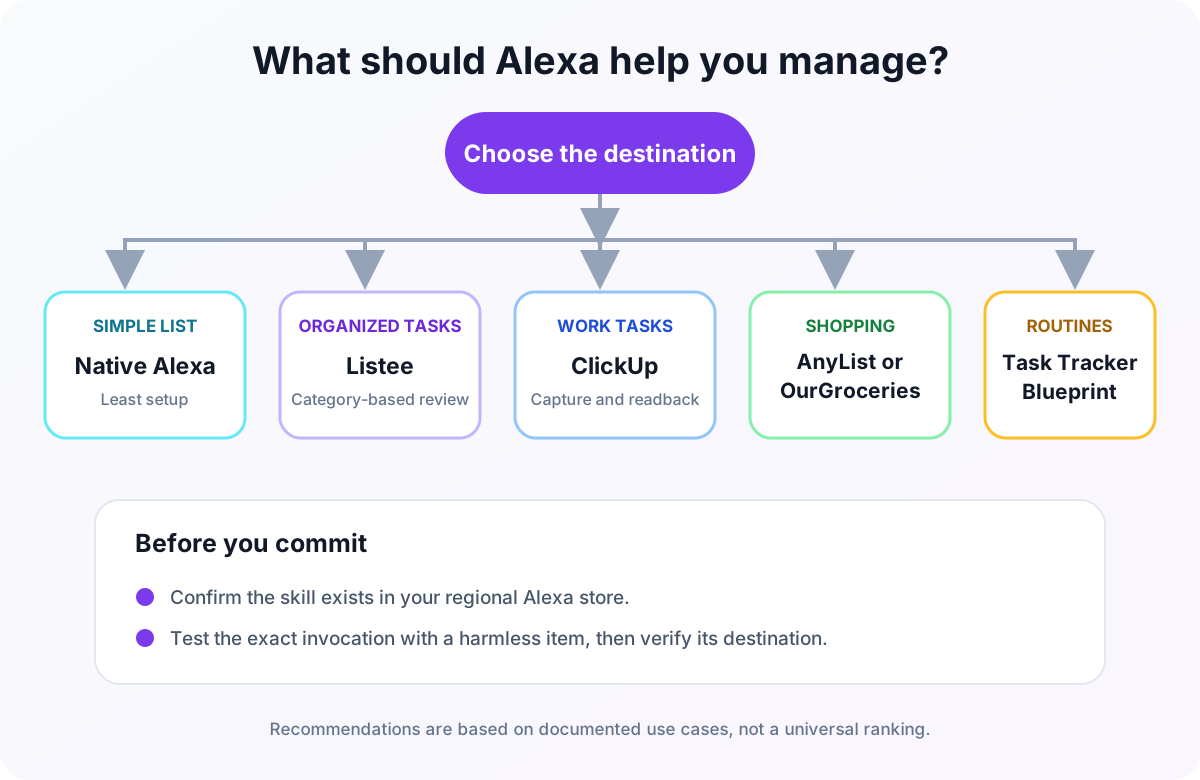
- Use native Alexa Lists when you want the least setup and basic list capture is enough.
- Use My Task by Listee when you want captured tasks organized into categories for later review.
- Use ClickUp when tasks belong in an existing work system and its listed readback commands are useful.
- Use AnyList when shopping plus recipe and meal planning are central.
- Use OurGroceries when a shared grocery list is the main job.
- Use Task Tracker Blueprint when the same checklist repeats.
Then evaluate friction. A separate account can be worthwhile if it gives you the right review interface, but every custom skill also adds an invocation phrase and an account-linking step. If another person will use the workflow, test whether they can remember the phrase and tell from Alexa's response where the item went.
Setup and reliability checks before you commit
Run a small acceptance test before moving your real routine:
- Find the skill in your local Alexa app or Skills Store.
- Link only the account the workflow should use.
- Say the vendor's exact invocation phrase with a harmless sample item.
- Listen for the skill name and destination in Alexa's response.
- Open the destination app and confirm the item arrived in the expected list, category, or workspace.
- Test from each Alexa device and household profile that will use it.
If Alexa sends an item to its native list instead of a custom service, the missing invocation name is the first thing to check. If a guide tells you to enable an old direct list sync, confirm it against current vendor documentation; the 2024 API change made many otherwise polished roundups historical rather than operational.
The practical answer
There is no single best Alexa task skill for every workflow. Native Lists win on simplicity, Listee connects voice capture to organized task categories, ClickUp fits work capture, AnyList and OurGroceries specialize in shopping, and Task Tracker Blueprint handles repeatable routines.
If structured voice capture is the problem you want to solve, create a free Listee account, enable one category for Alexa, and test it with a harmless sample task. If you need several voice-enabled categories, compare the current Listee plans before upgrading.