AI Task Manager: A Practical Workflow for Getting More Done
An AI task manager is a persistent task system with a language-driven assistant that can interpret requests, suggest structure, retrieve context, or take supported actions. The useful part is not the “AI” label. It is reducing the manual steps between a rough thought and a clear, reviewable next action.
AI does not make a task complete merely by creating, rewriting, or checking it. Real work still happens outside the list. A dependable workflow therefore separates five stages: capture, clarify, plan, execute, and review. AI can assist at several stages, but a person should approve consequential choices such as deadlines, assignments, deletion, and whether work is truly done.
What an AI task manager is useful for
Current products illustrate several distinct kinds of assistance. Listee's AI chat can perform supported task and category-note operations through natural-language requests. Todoist Assist includes Ramble for speech capture, Task Assist for suggestions and decomposition, Email Assist for extracting action items, and Filter Assist for plain-language filters.
Those examples point to five practical jobs:
| Job | Useful AI contribution | Required human check |
|---|---|---|
| Capture | Turn speech or a brain dump into candidate tasks | Did it preserve every commitment and proper noun? |
| Clarify | Rewrite vague items as observable next actions | Does the wording match the real intention? |
| Decompose | Suggest smaller steps for a complex outcome | Are steps necessary, ordered, and within scope? |
| Retrieve | Search tasks or related notes using natural language | Is the result complete and from the right workspace? |
| Review | Summarize open items or flag possible duplicates | Which items should actually be changed, delegated, or deleted? |
The distinction between a suggestion and an action matters. “Here are five possible steps” is reversible. “I deleted five duplicate tasks” changes stored data. A good system makes that boundary visible and provides enough context to review the result.
AI is less useful when the underlying list is unreliable. If tasks live across chat messages, sticky notes, email, and several apps, a polished summary may still omit the only copy of an important commitment. Start with one durable system of record and use AI around it.
The five-step AI task-management workflow
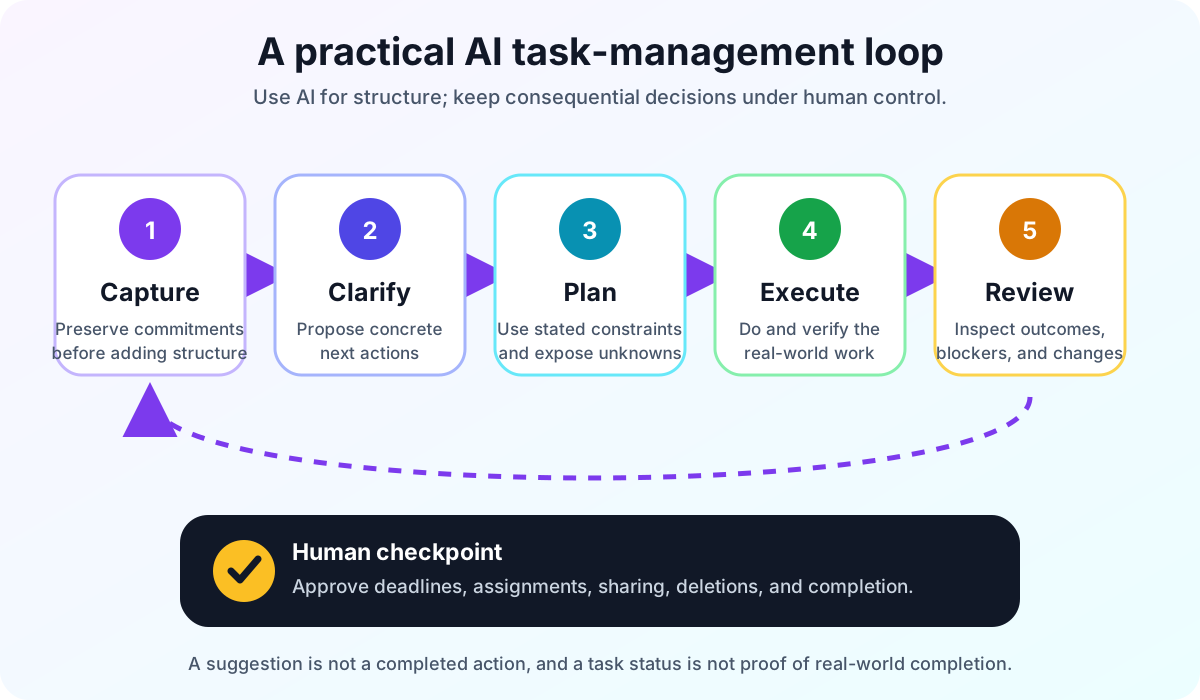
AI proposes structure and performs supported tool actions; the user approves high-impact decisions and verifies real-world completion. This is an explanatory diagram, not product UI.
1. Capture without forcing a full plan
Capture should be fast enough to use when attention is elsewhere. Speak, paste, or type the commitment in ordinary language. Include names, dates, or destinations only when you know them.
A bounded capture request could be:
Turn this brain dump into candidate tasks. Preserve names and dates exactly. Do not invent deadlines or assign anyone. Show me the list before saving it.
The expected output is a preview, not an automatically approved project plan. Check the item count against the source. If you said seven commitments and received six tasks, find the missing one before continuing.
Voice capture can reduce typing, but the device path still matters. Todoist Ramble works inside supported Todoist apps. Listee offers a separate Alexa route for direct Echo capture with “Alexa, ask my task to add…”. The Alexa task-manager setup guide explains why capture should be followed by review in the destination app.
2. Clarify each item into a next action
Vague nouns such as “budget,” “launch,” or “dentist” preserve a topic but not a commitment. Ask AI to propose a verb-led next action while retaining the original text for comparison.
For example:
For each selected task, propose one concrete next action. Keep the original beside the proposal. If the owner, outcome, or prerequisite is missing, ask a question instead of guessing.
“Launch” might become “Confirm the launch checklist owner,” but only if that is what the user intends. The assistant cannot infer an unspoken business decision safely. A question is a valid result.
Keep reference material out of the task title. Meeting notes, constraints, links, and decisions belong in a note, description, or attached context supported by the product. In Listee, category notes can store that context separately from checkable tasks; the note-taking guide describes the current note workflow.
3. Plan with constraints, not magic priorities
AI can help surface dependencies and propose an order, but it needs constraints. Provide available time, hard deadlines, energy needs, and tasks that cannot move. Ask it to mark uncertainty explicitly.
Propose an order for these tasks using only the deadlines and dependencies shown. Do not invent urgency. Put any task with missing information in a “needs decision” group.
This produces a draft plan that a person can challenge. If the task manager supports dates, priorities, reminders, or assignees, approve those fields individually before saving them. If it does not, keep the order simple and store only what the system can represent reliably.
This is where product differences become important. Todoist provides structured dates, deadlines, priorities, filters, reminders, and multiple planning views. Listee currently provides categories, completion state, and manual ordering. The Todoist versus Listee comparison shows how those data models change the planning workflow.
4. Execute from a small, stable list
Stop planning once the next actions are clear enough to begin. Select a short working set and do the real work. AI may draft a checklist or retrieve a note, but it should not repeatedly regenerate the plan while you are executing it.
When a task produces an artifact, verify the artifact before marking the task complete. Sending an email, publishing a page, submitting a form, or deploying code creates external state. A confident assistant response is not proof that the external action succeeded.
Use explicit completion criteria:
- “Draft announcement” is complete when a named reviewer has the draft.
- “Pay invoice” is complete when the payment provider shows a confirmed receipt.
- “Publish article” is complete when the public URL loads with the expected metadata.
If the product allows AI to change status, ask it to show the exact task and current category before marking it complete. For high-impact or irreversible actions, perform the final step manually or require confirmation.
5. Review outcomes and clean the system
A daily review asks: What was completed? What is blocked? What changed? What must be renegotiated? A weekly review also checks stale tasks, duplicates, overloaded categories, and projects with no next action.
An evidence-aware review request could be:
List incomplete tasks in this category. Group exact or near-duplicate titles, but do not delete anything. Identify items that have no clear verb. Cite the task titles you used.
Approve changes in small batches. If search is title-based, do not assume it found relevant details hidden in notes or different wording. If the assistant cannot access external systems, treat statements about email, calendars, documents, or deployments as unverified until you check those sources.
End the review with a compact record: completed items, blockers, changed commitments, and the next review date. That record makes the workflow observable without pretending the AI caused a productivity gain.
Prompt patterns that produce usable tasks
Good prompts define the source, allowed transformation, forbidden assumptions, and review format. Reuse these patterns with your own data:
Convert notes into candidate tasks
From the text below, extract only explicit commitments. Keep dates and names verbatim. Put unclear statements under “questions.” Return a preview and do not save anything.
Break down a complex task
Suggest the smallest sequence that would make this task startable. Use at most seven steps. Mark dependencies and unknowns. Do not add scope that is not in the task or note.
Prepare a focused work list
From these selected tasks, propose three items for a 60-minute session. Use the stated deadlines and effort estimates only. Explain why each item fits, then wait for approval.
Review before a status change
Show the task title, current category, and requested new status. Ask for confirmation before changing it. Do not modify any other task.
Find context without inventing it
Search task titles and category notes for this project name. Separate exact matches from possible matches. Say which sources were unavailable.
These prompts do not guarantee accurate output. They make omissions and assumptions easier to see.
Keep high-impact decisions under human control
The NIST AI Risk Management Framework treats trustworthiness and risk management as ongoing responsibilities. NIST's guidance on human-AI interaction notes that models can remove necessary context, outcomes can vary, and human roles and oversight should be clearly defined.
For personal task management, a proportionate policy can be simple:
- Let AI suggest titles, groups, steps, and possible duplicates.
- Require approval for deadlines, assignments, sharing, status changes, and deletions.
- Verify completion against the real system where the work happened.
- Do not paste secrets, regulated data, private client material, or another person's personal information without understanding the product's data handling.
- Keep a manual path for capture and review when the assistant or network is unavailable.
The risk depends on the task. Misclassifying “buy coffee” is inconvenient. Deleting a legal deadline or assigning confidential work to the wrong collaborator can be serious. Match the confirmation step to the consequence.
How to choose an AI task manager
Evaluate a product with one real workflow and these questions:
- System of record: Does the product store tasks in a durable, inspectable list, or only in chat history?
- Action surface: Can AI merely suggest text, or can it create, update, complete, move, share, and delete tasks?
- Review controls: Is there a preview, confirmation, undo path, or activity history before and after changes?
- Data model: Does it represent the dates, owners, dependencies, categories, notes, or reminders your workflow needs?
- Data scope: Which tasks, notes, messages, files, and external services can the assistant access?
- Plan limits: Are requests, history, models, integrations, or automation actions restricted by plan?
- Fallback: Can you still capture and manage tasks efficiently without AI?
Write down the result rather than relying on a demo. Test one ambiguous task, one duplicate, one dated commitment, one search request, and one attempted high-impact change. Note where the product asks for confirmation and where it guesses.
A concrete Listee workflow
Listee's verified AI tools can create, list, rename, complete or uncomplete, delete, and search tasks. They can also create, read, update, list, delete, and search category notes. The assistant first retrieves available categories so it can use the correct stored identifier rather than guessing a destination.
A practical first session is intentionally small:
- Create a temporary category with non-sensitive tasks.
- Ask the assistant to list categories and add three explicit tasks to the temporary category.
- Ask it to rename one task and show the category's remaining tasks.
- Complete one task only after confirming the exact title.
- Store one short project note and retrieve it by title.
- Review every change in the normal task and note interfaces.
The current Listee Free plan includes 50 AI requests per month and 14 days of chat history. Higher plans list larger request quotas, and Plus includes API/MCP access. Check the AI Assistant guide and current pricing before relying on a specific quota or integration.
This article does not claim that Listee has verified structured due dates, priorities, reminders, or recurring tasks. Use the task-management guide for the current non-AI task actions. If you need a field that is absent, keep it in a system that represents it directly rather than asking AI to simulate it in prose.
Start with one bounded workflow
An AI task manager is useful when it turns messy input into a clearer, durable system without hiding important decisions. Begin with one low-risk capture–clarify–review loop, record the manual steps it removes, and verify every stored change. Expand only when the review cost stays lower than the organizational benefit.
To test that workflow with Listee, create a free account, use synthetic or non-sensitive tasks, and keep the first session small enough to inspect completely.